
Community
Share your experience!
Vorschläge aktivieren
Mit der automatischen Vorschlagsfunktion kannst Du Deine Suchergebnisse eingrenzen, da während der Eingabe mögliche Treffer angezeigt werden.
Suchergebnisse werden angezeigt für
Jetzt anmelden und Teil der Community werden!
- Community
- TV & Home Cinema
- Android TV
- KD-43X8309C Android 6 recurrent reboot
Optionen
- RSS-Feed abonnieren
- Thema als neu kennzeichnen
- Thema als gelesen kennzeichnen
- Diesen Thema für aktuellen Benutzer floaten
- Lesezeichen
- Abonnieren
- Stummschalten
- Druckansicht
KD-43X8309C Android 6 recurrent reboot
GELÖST

- Als neu kennzeichnen
- Lesezeichen
- Abonnieren
- Stummschalten
- RSS-Feed abonnieren
- Kennzeichnen
- Anstößigen Inhalt melden
Februar 2017
Februar 2017
As the topic after the upgrade to Android 6 recurrent reboot. Please help me with the problem.
Gelöst! Gehe zu Lösung.
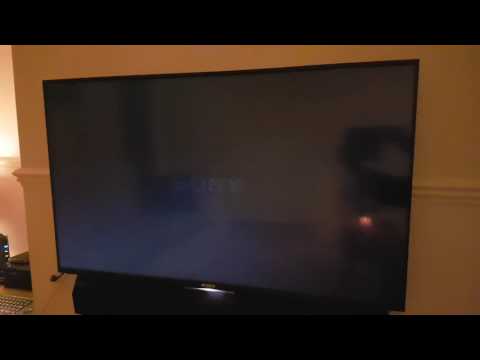
Uploaded by Tomek on 2017-02-23.
2 AKZEPTIERTE LÖSUNGEN
Akzeptierte Lösungen


- Als neu kennzeichnen
- Lesezeichen
- Abonnieren
- Stummschalten
- RSS-Feed abonnieren
- Kennzeichnen
- Anstößigen Inhalt melden
Februar 2017
Februar 2017
Check out this German thread with the solution. @Anonymous should probably make a stick thread.


- Als neu kennzeichnen
- Lesezeichen
- Abonnieren
- Stummschalten
- RSS-Feed abonnieren
- Kennzeichnen
- Anstößigen Inhalt melden
Februar 2017
Februar 2017
There are actually some ways to "solve" but from PAA and US Sony support and NOT EU or UK.
Those methods seem not to solve this problem for most users but in some cases, as @Kuschelmonschter reports or other cases in USA bootloop was solved.
https://sony-paa-pa-en-web--paa.custhelp.com/app/answers/detail/a_id/129220
Safe Mode Worked for my TV but without the bootloop issue
https://us.en.kb.sony.com/app/answers/detail/a_id/75705/
(Option C) Here the trick seems to be a second factory reset and that's why it is mentioned after step six. Try this without any kind of connection on your TV(USB, HDMI, SCART, aerial-Sat) remove batteries from any extra Bluetooth R/C(like RMFTX100), turn OFF bluetooth on all other devices in home and turn OFF any WiFi router in home or remove wired lan connection.
https://us.en.kb.sony.com/app/answers/detail/a_id/73159/
This also worked for some people in US
14 ANTWORTEN 14
- Als neu kennzeichnen
- Lesezeichen
- Abonnieren
- Stummschalten
- RSS-Feed abonnieren
- Kennzeichnen
- Anstößigen Inhalt melden
Februar 2017
Februar 2017
Check out this German thread with the solution. @Anonymous should probably make a stick thread.
- Als neu kennzeichnen
- Lesezeichen
- Abonnieren
- Stummschalten
- RSS-Feed abonnieren
- Kennzeichnen
- Anstößigen Inhalt melden
Februar 2017
Februar 2017
There are actually some ways to "solve" but from PAA and US Sony support and NOT EU or UK.
Those methods seem not to solve this problem for most users but in some cases, as @Kuschelmonschter reports or other cases in USA bootloop was solved.
https://sony-paa-pa-en-web--paa.custhelp.com/app/answers/detail/a_id/129220
Safe Mode Worked for my TV but without the bootloop issue
https://us.en.kb.sony.com/app/answers/detail/a_id/75705/
(Option C) Here the trick seems to be a second factory reset and that's why it is mentioned after step six. Try this without any kind of connection on your TV(USB, HDMI, SCART, aerial-Sat) remove batteries from any extra Bluetooth R/C(like RMFTX100), turn OFF bluetooth on all other devices in home and turn OFF any WiFi router in home or remove wired lan connection.
https://us.en.kb.sony.com/app/answers/detail/a_id/73159/
This also worked for some people in US
- Als neu kennzeichnen
- Lesezeichen
- Abonnieren
- Stummschalten
- RSS-Feed abonnieren
- Kennzeichnen
- Anstößigen Inhalt melden
Februar 2017


- Als neu kennzeichnen
- Lesezeichen
- Abonnieren
- Stummschalten
- RSS-Feed abonnieren
- Kennzeichnen
- Anstößigen Inhalt melden
Februar 2017
Februar 2017
I have exactly the same problem as shown in the video.
The forced factory reset doesn't work for me, it doesn't do anything.
I've downloaded the software update onto USB, plugged it in, tried various combination of power on/off, plug the USB in, forced factory reset etc.
Safe mode doesn't work either.
So unfortunately although the solutions proposed may have worked for some, not for me ;(


- Als neu kennzeichnen
- Lesezeichen
- Abonnieren
- Stummschalten
- RSS-Feed abonnieren
- Kennzeichnen
- Anstößigen Inhalt melden
Februar 2017
Februar 2017
I have the same problem:
https://www.youtube.com/watch?v=Kw1kpoaO-bk
I have tried multiple things without success. Sony said they will let me know when its sorted as they think its a software problem and i left my phone number with them.
This is the link i started:

Having a problem after updating my Sony tv 43W755C last night (22/02/17)
- Als neu kennzeichnen
- Lesezeichen
- Abonnieren
- Stummschalten
- RSS-Feed abonnieren
- Kennzeichnen
- Anstößigen Inhalt melden
Februar 2017
Februar 2017
Hello, as you know, I had this problem and helped Option C from this link https://sony-paa-pa-en-web--paa.custhelp.com/app/answers/detail/a_id/129220
I tried to perform these actions several times and finally succeeded. I suspect to inaccurately pressed volume -. Do not give up. Good luck
- Als neu kennzeichnen
- Lesezeichen
- Abonnieren
- Stummschalten
- RSS-Feed abonnieren
- Kennzeichnen
- Anstößigen Inhalt melden
Februar 2017
Februar 2017
Thanks for the reply. I will keep trying somhow.
- Als neu kennzeichnen
- Lesezeichen
- Abonnieren
- Stummschalten
- RSS-Feed abonnieren
- Kennzeichnen
- Anstößigen Inhalt melden
Februar 2017
Februar 2017
Thanks for the reply. I have tried multiple times with the forced factory reset. From reading some of the support articles it looks as if this only works if you have Android Marshmallow installed - I suspect I have a failed install following a failed upgrade from Lollipop - hence I no working OS. Gonna call Richer Sounds today as I'm only 18 months into a 6 year warranty.
- Als neu kennzeichnen
- Lesezeichen
- Abonnieren
- Stummschalten
- RSS-Feed abonnieren
- Kennzeichnen
- Anstößigen Inhalt melden
Februar 2017
Februar 2017
Sony customer support suggest trying the forced factory reset again - this time keep holding the on/off and volume down buttons for up to 30 seconds. Confirmed this is an issue and there are other cases. Will try it when I get home, fingers crossed .......

0online
1904311Beiträge